Container Overview
Containers is a word often thrown around these days, but what is a “container” and where does it fit in with other tools? You have probably heard of Docker, and maybe also OCI, Kubernetes, Singularity, or Apptainer. Those are all container ecosystems, ways/schemes of doing containers and tools to work with them.
Objectives
Understand what containers are
Know the basic container terms and their differences
Have a top-level overview of what container ecosystems provide
Make a simple container image and image
Instructor note
30 min teaching
The Problem Being Solved
It is best to start at the problems containers are trying to solve. There are many different ones that people use them for.
One problem is making and using reproducible software environments. This is important for anythign requiring reproducible workflows. Examples include reproducible research, automated software testing, reproducible build farms, etc. Automated software testing often follows the principle of “test early and test often”. This often includes deplyment tests since deployment is hard, leveraging containers as easy to setup and redo deployment environments.
Another is to work around limitations of the host system. No host system is compatible with all software environments. It can often happen that the host system is compatible with some of the software one wants to run but not others. Incompatibilities can range from where things are placed on the filesystem, the particular libc used, permissions setup, etc. Common incompatibilities are the versions of dependencies, configurations, etc.
A big one these days is isolating software from each other and the host system. Isolation is used to reduce attack surface and reduce the scope of damage that bugs and security vulnerabilites can cause. With security vulnerabilities, isolation is defense in depth, putting up more obstacles to attackers that they would have to get through making it more costly to get through all the defenses and more likely that the attack is noticed before it gets through.
Alternatives
Containers are not the only tool for these problems. Many others exist with their own pros and cons. It is important to know when to use the right tool for the right job. Many times, more than one of these will be used together and even used together with containers.
Programming Language Specific Environments
Many programming languages have environments (sometimes known as virtual environments) specific to the programming language ecosystem. A good example would be Python’s Virtual Environments. They are often good at making simple environments of various packages written in that programming language for use by software written in that programming language. Their main upside and downside is the same, they are specific to that programming language. They have essentially no isolation.
Fully Static Linked Compilation
Executable programs can use libraries in a variety of ways:
Dynamically find libraries and access their contents at runtime (dlopen, dlclose, dlsym, etc.)
Access libraries on the system at startup through shared linking
Have all required libraries compiled into the program at build time via static linking
Shared linking is often used to reduce disk and memory use because multiple programs share the same library on disk and when it is loaded into RAM. This poses the difficulty of making sure the shared libraries are compatible with all the software that needs them on the system, something Linux distros spend a lot of time and effort on. Dynamically loaded libraries are often used for optional libraries such as plugins.
Static linking lets a program be run somewhere that doesn’t have the libraries that were static linked in, as those libraries were only needed at compile time. Static linking can run the full range from doing just a few libraries all the way to all libraries including libc. Fully static linked programs then depend only on the hardware architecture, the OS kernel, any assumptions about the OS and execution environment they have baked in, and any programs they try to run. Depending on the programming language, partial or full static linking can range from being the norm, being easy but not default, to extremely difficult to impossible. And it simply doesn’t work for some styles of plugins and similar optional features that are detected at runtime.
Static linking provides essentially no isolation other than being immune to tampering of the shared library equivalents of the libraries static linked. More isolation requires additional steps.
HOME Directory Builds
A common solution on systems where one is an unprivileged user or wants software that isn’t part of the distro’s package repositories is to simply build all the extra software in one’s HOME directory. Many programming language’s package ecosystems do this. It is often possible to setup a wide variety of software this way. But HOME directory builds are often brittle unless restricted to a programming language’s package ecosystem, assuming that ecosystem is not itself brittle. Tooling for general HOME directory builds is often poor. HOME directory builds often have portability problems due to usernames getting baked into things due to the location in the HOME directory.
Isolation is usually absolutely terrible. Everything depends on where everything else is and isolation risk breaking the whole thing since they are brittle.
Chroot
Chroot stands for “change root”, in this case changing where / is.
Essentially, one setups up a directory like one would the top-level of the filesystem /.
Then one chroots into it, making that top-level directory be / for the rest of execution.
These are like HOME directory builds in many ways, but have more flexible directory structures and don’t bake in the path to the top-level directory everything is built under.
Since one is changing where / is, one needs to put all programs, libraries, and other files one needs into the chroot environment.
This often translates into a partial or full linux install inside.
This actually gives some isolation from the host system and other chroot environments. Unfortunately, Linux chroot environments are not hard to escape assumine one doesn’t use other tooling to support it (see man 2 chroot). This is in contrast to chroot on some BSDs which are much harder to escape.
All major extant container ecosystems use chroot in addition to other things for their operation. And in fact you will learn how to do them in a later lesson.
Virtual Machines
Virtual Machines (VM)s provide custom environments and high isolation. They can pretty much always be used, but they can be a lot of work and have high overhead. The isolation is particularly strong if the CPU and other hardware is fully emulated, though this has a performance penalty. VMs can also be stopped, paused, and even moved to another machine and resumed there. But it is difficult to transfer data between them and the host system and provide them raw file and hardware access to the host system. The latter requires root permissions on the host system. Additionally, good performance requires that the host system’s admins enable virtualization (otherwise, the CPU must be emulated).
Technically, VMs are containers, just a very heavy variety. They meet the definition completely, though most people will get confused if you call them containers.
What Is A Container
An overly broad and pedantic definition is “A runnable item that carries most of its dependencies inside itself.” But most people don’t use that definition. A more usable definition is
Container: A running or runnable item that carries all dependencies inside itself except for the OS kernel, a dedicated container runtime provided by the host OS, possibly things from other containers, and possibly a small selection of files/directories on the host.
In various container ecosystems, this concept is split into three different words with more precise meanings. Though, many people use them interchangeably and conflate them. They are:
Definition: Container
A running or ready to run copy of a container image, its environment, and any changes made to it.
Definition: Container Image
An image imported into the container system and ready to make containers from.
Definition: Image
The physical file/s that containers are made from and can be transported from one machine to another.
Where Containers Fit Among Other Solutions
Containers as a solution are compared to other solutions in Figure containers-fit-diagram.
They provide more ability to make a custom environment than deep static linking while being a lot more lightweight than virtual machines.
While they have more overhead than full static linking, they are often less painful to setup than full static linking in some programming languages (assumine one can do it at all).
Containers have some isolation, but not as much as virtual machines or separate machines which pay for that extra isolation in overhead.
In production environments, it is common to combine many of these.
There may be several separate machines all running separate VMs which themselves might be running containers, static linked programs, and shared linked programs.
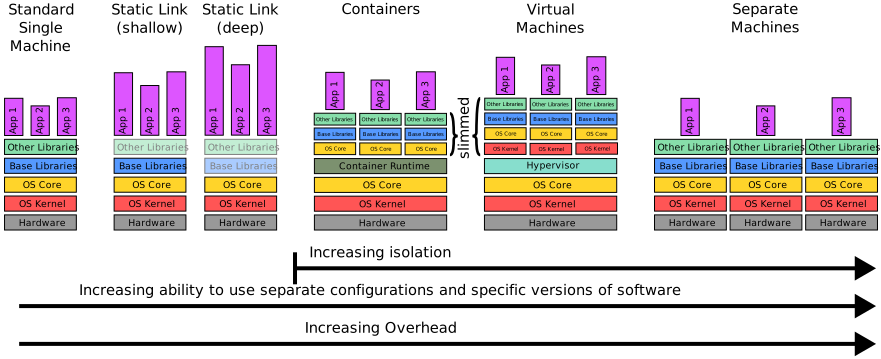
Diagram of where containers fit among other solutions on the scales of isolation, overhead, and how separate configurations and dependencies can be.
Container Limitations
Containers have a few limitations and things they don’t do well.
They can’t bring all dependencies with them. They still depend on the OS kernel and the CPU and memory architecture, and possibly also a container runtime. For example, a container meant to run on Linux on an Arm64 system will not run on Mac OS on a PowerPC processor without a emulation and compatibility layers, which depending on the combination may not exist. Some container tools actually use virtual machines to run such otherwise incompatible containers. A good example is Podman Desktop on Mac OS and Windows.
Containers don’t replace providing build systems for packages. If you expect people to use your software, provide them a build system to build it. If you don’t, people will be unable to reproduce it, assuming they even trust your container. Moreover, there is a high likelihood you may not be able to build that software again in the future. Container ecosystems come and go. If the one you used goes away, you and everyone else may not be able to use it as a build system anymore.
Connected to build systems, while containers can be great reproducible build environments, don’t make it impossible to build your software without using your special container. Doing it this way is extremely brittle. You aren’t providing working software and you may find it tough to rebuild your software in the future too.
Container Ecosystem Overview
There are many container ecosystems out there that have their own tooling, conventions, terminology, engineering tradeoffs, etc. Each ecosystem has its on image format, container image formats and conventions, and container conventions. Many of them have multiple compatible tools to choose from. Some of the ecosystems that exist are
Docker/OCI (Open Container Initiative)
etc.
etc.
Runtimes
Many container ecosystems use a runtime to help with the following:
Set containers up from container images
Run containers
Stop containers and clean up after them
Interface between the container and the host system
Some container ecosystems have more than one runtime, others have only one or a very manual one (a do it yourself chroot container is using you at the terminal as the runtime). For example, the OCI/Docker ecosystem has many different runtimes that are compatible from the container side. In the Apptainer/Singularity ecosystem, the build tool is the runtime and images are compatible between old Singularity, Apptainer, and Singularity CE/PRO.
Rootfull or Rootless
One of the big things with containers is what permissions are used when setting them up and running them. Different tools and ecosystems tend to favor one or the other, or sometimes only have one option.
Rootful methods require root permissions to run. The runtimes are often daemons, and work great for services. But it is dangerous to allow untrusted users to use them due to root access. Rootful is the default for Docker and Kubernetes, for example.
Rootless methods use build off of an unprivileged user namespace as the first stage to then setup the rest, sometimes with helper programs having elevated permissions (note, rootful also often start with a user namespace as the first stage). While safer than root, they do bring some dangers to the table, and this greater safety is paid for in extra configuration work and limitations. These limitations mean that some containers won’t run or build or behave right. This is the engineering tradeoff. Podman and modern Apptainer/Singularity are exclusively rootless (old Singularity used a rootful SUID program to do a lot of the setup, so it was quasi-rootful).
Making A Simple Container Image and Image
Later lessons need a simple container image and image to work with, so it is time to make one. It will have enough for a minimal Linux shell session with a few basic utilites. We will use BusyBox since it is designed for small systems and doesn’t require any libraries (fully static linked).
A Bit About BusyBox
The busybox executable is special.
It has the basic POSIX commands as subcommands, which can be called like
busybox COMMAND [ARGS]
where COMMAND could be ls, sh, grep, cd, mount, etc.
All these subcommands are more minimal compared to GNU coreutils and other packages, providing the bare minimum required by POSIX.
BusyBox is designed for small systems after all.
One very important thing to note, its shell is an Almquist Shell (ash) which is much more minimal than Bash and Zsh (sh is an alias for it).
So, be careful.
Type-Along
Try seeing the contents of your current directory with ls by
busybox ls
Then, launch a shell with BusyBox, run ls, and exit with Ctrl+D
> busybox sh
~/foo $ busybox ls
bar
~/ foo $
>
Now, the special thing about busybox is that there is a shortcut for accessing its commands.
If you execute a symlink with the name COMMAND that is pointing to busybox, it runs like busybox COMMAND.
Type-Along
Make a ls and mkdir symlinks point to busybox.
> ln -s $(which busybox) ls
> ln -s $(which busybox) mkdir
Then make a directory and run look at the results.
> ./mkdir baz
> ./ls -lh
total 8K
drwxr-xr-x    1 foo foo       0 Mar 31 16:21 baz
lrwxrwxrwx    1 foo foo      16 Mar 31 16:21 ls -> /usr/bin/busybox
lrwxrwxrwx    1 foo foo      16 Mar 31 16:21 mkdir -> /usr/bin/busybox
This special feature makes it very easy to make small container images and images using BusyBox as well as using it as the core utils on resource constrained systems. This makes BusyBox very popular to base containers off of.
Make The Container Image
We need to make a small minimal Linux filesystem tree in a directory that uses BusyBox.
Create a directory for your container image, and remember it for later lessons as you will use it.
Let’s call that directory CONIMGDIR.
Then, under it, make the filesystem tree like
CONIMGDIR/: top-level directoryCONIMGDIR/bin: symlink tousr/bin(it must be a relative link)CONIMGDIR/dev: directoryCONIMGDIR/dev/null: empty fileCONIMGDIR/etc: empty directoryCONIMGDIR/proc: empty directoryCONIMGDIR/usr/: directoryCONIMGDIR/usr/bin/: directoryCONIMGDIR/usr/bin/busybox: Copy thebusyboxprogram to hereCONIMGDIR/usr/bin/COMMAND: VariousCOMMANDsymlinks tobusybox(relative link)CONIMGDIR/root: empty directory
For the COMMAND symlinks, you need at least the following:
ashcdcplnlsmkdirmountmvpsrmshtouchumount
You have now made your first container image
Making The Image
Making that container image took some time.
It would be annoying very quickly to have to remake it many times.
This is where making an image comes in.
With the image, it is trivial to make a fresh container image from it.
For simplicity, we will make the image using tar.
Choose a name for your image.
Let’s call it IMG.
Type-Along
Then, you would make the image by
> tar -C CONIMGDIR --owner=root --group=root --sort=name -czvf IMG.tgz .
./
./bin
./dev/
./dev/null
./etc/
./proc/
./root/
./usr/
./usr/bin/
./usr/bin/ash
./usr/bin/busybox
./usr/bin/cd
./usr/bin/cp
./usr/bin/ln
./usr/bin/ls
./usr/bin/mkdir
./usr/bin/mount
./usr/bin/mv
./usr/bin/ps
./usr/bin/rm
./usr/bin/sh
./usr/bin/touch
./usr/bin/umount
The -C CONIMGDIR option made tar run as if it inside the container image directory so that there is no CONIMGDIR to all paths.
The --owner=root and --group=root options made it so the the ownership is recorded to the tarball as root:root.
The --sort=name option is just a convenience option to sort the file names as they are being added, which can can be nice.
You now have your first image, which you could unpack into a directory to make a fresh container image.